JetPallet Try it free

For forwarders and dispatchers

Will it fit the trailer – and how do you load for three drops?

Dispatch usually receives pallet counts, weights and addresses, rarely a load plan. JetPallet places the actual loaded pallets in the cargo space, works out axle loads from the real positions, sequences the pallets so that every drop can be unloaded towards the rear doors without restacking, and produces a driver sheet in 47 document languages.

What you end up with

  • Vehicle load plan as PDF, with a driver sheet per drop
  • Driver sheet and load plan in 47 languages, including Polish, Romanian, Ukrainian, Turkish and Arabic
  • Mobile loading view as a single HTML file for any browser
  • Shareable HTML 3D plan with layer slider and top view
  • Axle loads of the layout as CSV
  • Pallet labels with SSCC and GS1-128 as PDF
  • Results for ERP/WMS as JSON, WMS CSV or EDIFACT DESADV D.96A

Where dispatch loses time today

Whether the last pallet still goes on the trailer is often settled at the loading dock. The loading metres add up on paper, but one pallet is taller than announced, two must not be double-stacked, and the goods for the last drop are standing against the headboard.

A spreadsheet will not answer the questions that follow:

  • Is any single axle overloaded, even though the gross weight is fine?
  • Can the driver unload at the second drop without moving pallets meant for the third?
  • Will a driver who doesn’t read English or German understand the plan?
  • Is one vehicle enough, or would two smaller ones cost less?
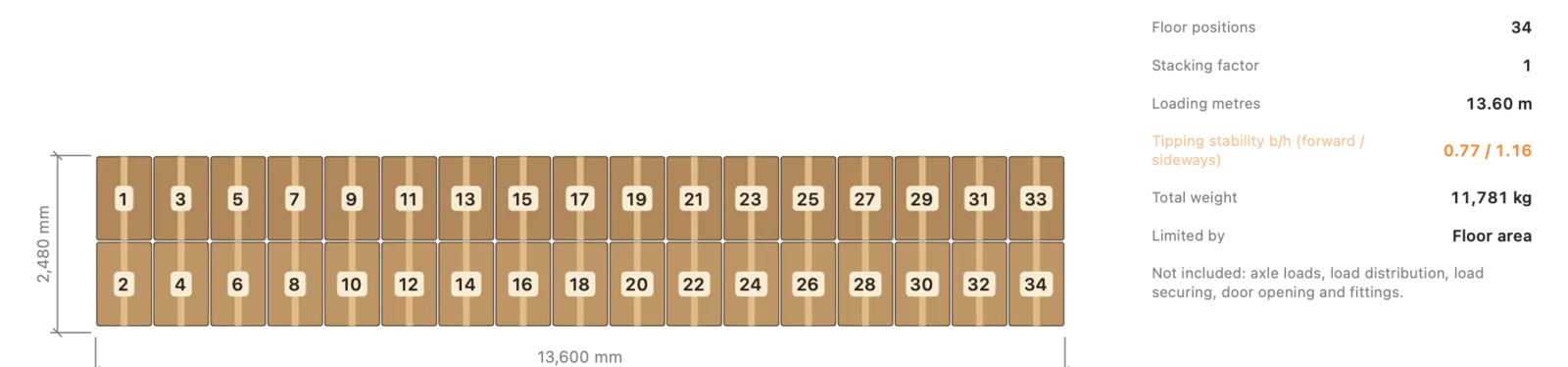
13.6 m2480 mm
13.6 m semi-trailer: 34 EUR pallets crosswise (2 × 17), 13.6 loading metres. Illustration, calculated with this page’s web calculator.

Workflow

How you work with JetPallet.

  1. 1

    Take over or import the pallets

    Pallets planned in JetPallet arrive in the vehicle plan with their actual height including the pallet base and their gross weight. Packing lists from a shipper’s system come in as CSV or XLSX with column mapping; orders from an ERP or WMS as JSON.

  2. 2

    Choose the cargo space

    The library holds 21 sourced cargo-space profiles with dimensions taken from manufacturer documents: 20′, 40′, 40′ HC and 45′ HC containers, reefer, open-top and flat-rack containers, curtainsider, box, mega and reefer semi-trailers, and swap bodies. For single-SKU pallets, “Plan cargo space” also offers the 7.5 t truck and the US 53′ trailer. Your own vehicles are added as custom cargo spaces and can be shared with colleagues as JSON.

  3. 3

    Assign drops and check the sequence

    Each pallet is given its delivery stop. The plan checks a straight unloading path to the rear: pallets for later drops must not block earlier ones. Exclusion areas in the cargo space are respected as well.

  4. 4

    Estimate axle loads and securing

    Pallet positions and gross masses give the axle and kingpin loads; you enter the axle geometry, unladen loads and limits. Load securing is re-estimated for the remaining cargo after each drop.

  5. 5

    Hand the documents to driver and warehouse

    The vehicle load plan PDF contains a driver sheet for each drop. The mobile loading view is a single HTML file that drivers and warehouse staff open in a browser – step by step, with loading and unloading modes.

In detail

In detail

01

Cargo-space planning with real pallets

Planning uses the true height and weight of each pallet rather than flat-rate values. Pallets stay upright on the floor; you decide whether they may be stacked. Pallets that don’t fit stay visible instead of quietly disappearing.
Cargo-space planning with real pallets
Actual JetPallet interface.

02

Axle loads from the actual layout

JetPallet calculates axle loads from where the pallets actually stand. If a pallet’s centre of gravity is unknown, the result reads “input required” instead of an unstated assumption. A balancing step shifts the layout when an axle exceeds its limit, and a strict axle check can be switched on in the settings. Axle groups are split into single axles; you enter the limits yourself or fill in suggested values under Directive 96/53/EC with one button. More under axle loads.

03

Multi-drop with a clear path to the doors

For routes with several consignees, the plan groups pallets by drop. An independent check confirms for every drop that its pallets can be taken out without moving anything else. You set the order of the drops – JetPallet does not plan road routes. See mixed pallets and multi-drop.

04

Cheapest vehicle choice

Using your cost per trip and per kilometre, JetPallet finds the cheapest feasible combination of built-in and custom cargo spaces, mixed if need be. The solution with the fewest vehicles is shown alongside, optionally with a CO₂e comparison figure. Small cases are solved exactly; larger ones are marked as an approximation, meaning the minimum is not proven. The app does not estimate freight rates; the numbers come from you.

Cheapest vehicle choice
Actual JetPallet interface.

05

Load securing as an estimate

Tie-down and direct lashing are estimated with reference to EN 12195-1, and the capacity of headboard, side walls and rear wall with reference to EN 12642. Gaps and unknown weights raise warnings. The result can be added to the load plan PDF as a section with a liability notice. It does not replace a check by a competent person – see load securing.

06

Load line, double deck and compartments

Reefer containers carry their load line as the maximum stowage height; the check flags pallets above it. Double-deck cargo spaces are planned with 1 to 3 decks, each with its own floor level, clear height and payload – for a single vehicle, with axle-load balancing disabled. Multi-compartment vehicles are split by partitions into 1 to 5 compartments, for example for temperature zones. Identical unit loads can be stacked with “Pallets on top of each other”; you set the permitted top load from external data, and JetPallet does not prove load-bearing capacity.

Questions

Frequently asked questions.

Our dispatch office runs on Windows. Is a Mac app any use to us?

JetPallet runs only on a Mac with macOS 15 or later. The results are not tied to the Mac, though: load plan and driver sheet are PDF files, and the mobile loading view and 3D plan are single HTML files that open in any current browser. One Mac does the planning, everyone else reads.

Which vehicles does JetPallet know?

21 sourced cargo-space profiles with dimensions from manufacturer documents: 20′, 40′, 40′ HC and 45′ HC containers, reefer, open-top and flat-rack containers, curtainsider, box, mega and reefer semi-trailers, and swap bodies. For single-SKU pallets, “Plan cargo space” also offers the 7.5 t truck and the US 53′ trailer. Other vehicles can be added as custom cargo spaces and exchanged as JSON files.

Does JetPallet plan the route as well?

No. You set the order of the drops and JetPallet arranges the pallets so that each drop can be unloaded towards the rear. Road routes, time windows and forklift working space are not planned.

Is the calculated load securing legally binding?

No. It is an estimate with reference to EN 12195-1 and EN 12642 and carries a liability notice. Responsibility for securing the load stays with the shipper and the driver.

Run your next route through JetPallet

Free for 14 days, then USD 99 a year for the complete version. For several workstations, ask us via the contact page.

Try it free

Free for 14 days · then USD 99/year

Try it free14 days freeUSD 99/year