JetPallet Try it free

Use case · Palletising

Calculate how many cartons fit on a pallet

The number of cartons on a pallet is cartons per layer × number of layers, capped by the permitted total height and weight. The layer count is quick to work out; the layer pattern is what really decides it. For a 350 × 250 mm carton on a Euro pallet, the pattern is the difference between 9 and 10 cartons per layer. JetPallet searches for that pattern automatically and updates the result as you type.

Several pattern families, checked independently

1200 mm800 mm350 mm350 mm250 mm250 mm350 mm350 mm
Layer plan: carton 350 × 250 mm on 1200 × 800 mm – 10 per layer. Drawn by this page’s web calculator.

Workflow

How it works in JetPallet.

  1. 1

    Enter the carton and the load carrier

    Enter length, width, height and weight of the filled carton and pick the load carrier – a Euro pallet, a 1,200 × 1,000 mm industrial pallet, a half pallet, a 48 × 40 in pallet or a custom size. You can enter millimetres, inches and feet as well as kilograms and pounds, including fractions such as 12 3/8 in.

  2. 2

    Set the limits

    Set the maximum total height and payload and, if needed, overhang or underhang for each side of the pallet. Each field is checked as you type.

  3. 3

    Compare patterns

    JetPallet works through several pattern families live and shows cartons per layer, layers, total cartons, height, gross weight and area used. The variant comparison puts the patterns it found side by side.

  4. 4

    Choose and check the layer sequence

    Decide whether every layer is identical, rotated by 180° or mirrored. JetPallet checks how much of each layer is geometrically supported by the layer beneath.

  5. 5

    Pass the result on

    Export a packing report or packing instructions as PDF, carton positions as CSV or JSON, or carry straight on to planning the truck.

Why mental arithmetic often comes up short

The obvious approach divides pallet length by carton length and pallet width by carton width. That gives a grid, with every carton facing the same way. It often leaves a strip empty that rotated cartons would fill.

Example: a 350 × 250 × 200 mm carton on a 1,200 × 800 mm Euro pallet, a maximum total height of 1,800 mm (an assumption) and a pallet height of 144 mm.

  • Layers: (1,800 − 144) / 200 = 8.28, so 8 full layers.
  • Grid: 9 cartons per layer, 72 per pallet, 82.0% of the area used.
  • Two-block (two zones with different orientations): 10 cartons per layer, 80 per pallet, 91.1%.

For 1,000 cartons that means 13 pallets instead of 14. Then come the constraints a spreadsheet rarely captures: weight, overhang, alternating layers and whether each layer still rests fully on the one below.

What you end up with

  • Cartons per layer, layers and total cartons
  • Load height, gross weight and load centre
  • Variant comparison of the patterns found
  • PDF packing report and packing instructions
  • Carton positions as CSV or JSON

In detail

In detail

01

Key figures in the inspector

The inspector shows cartons per layer, number of layers, any part layer on top, load height, gross weight including the pallet, area used, use of the available load volume and the centre of the carton midpoints (load centre).
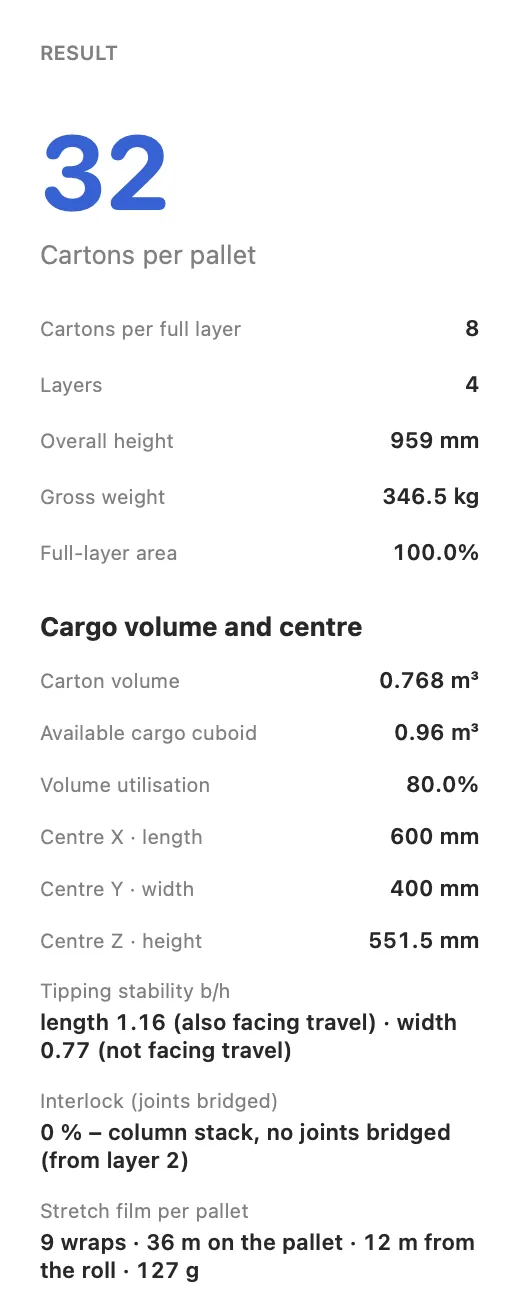
Key figures in the inspector
Actual JetPallet interface.

02

Layer sequence, support, overhang and underhang

Alternating layers (180°, mirrored) are calculated with a support check; the minimum support can be set anywhere from 0.1 to 100%. Overhang and underhang are entered per side, up to ±500 mm. Optionally, JetPallet checks how many carton labels face outwards.

03

Your own layers in the editor

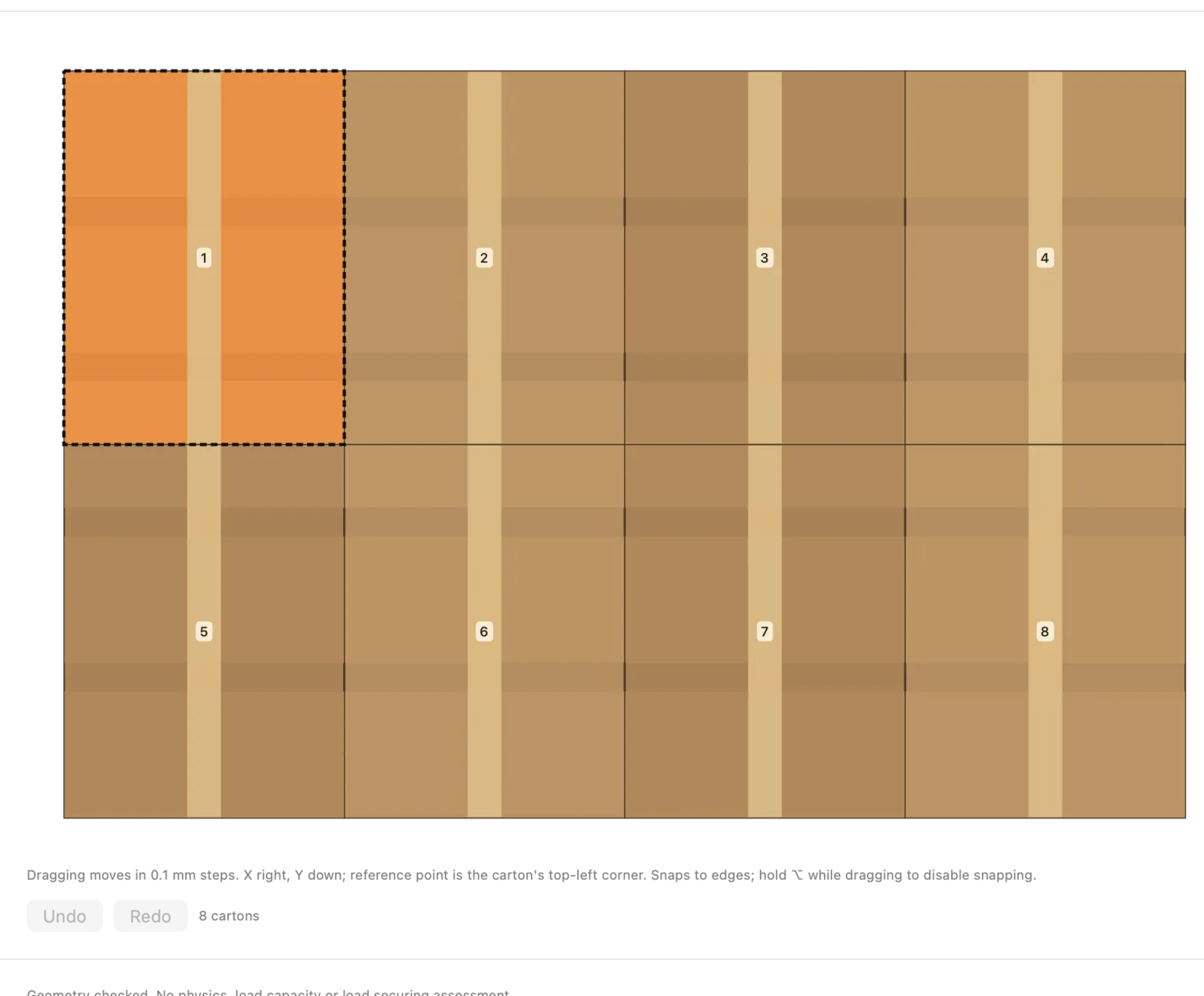
To reproduce an arrangement from the shop floor, place the cartons yourself in the layer editor: move, rotate, snap into place. Your layer goes through the same check as the automatic patterns.

Your own layers in the editor
Actual JetPallet interface.

04

Intensive search and exact small layers

For awkward dimensions there is an intensive search that you start explicitly. For small layers, JetPallet can prove that no layer with more cartons exists; where the search was limited, the result says so.

Questions

Frequently asked questions.

How do I calculate how many boxes fit on a pallet?

Multiply cartons per layer by the number of layers. The layers are (maximum total height minus pallet height) divided by the carton height, rounded down. Then check that the weight stays within the permitted payload and reduce the count if it does not.

Why do more cartons sometimes fit in a layer with the same box?

Because the pattern matters. A grid turns every carton the same way and often leaves a strip empty. A two-block or pinwheel pattern rotates some of the cartons and uses that strip. For 350 × 250 mm on 1,200 × 800 mm that is 10 cartons per layer instead of 9.

Can I try this without the app?

Yes. The web calculator on this site works out grid and two-block patterns for one carton and one pallet. The Mac app adds further pattern families, layer sequences, overhang and underhang, and reports.

Read on

Related pages.

Run the numbers for your carton

Try simple patterns in the web calculator, or test JetPallet free for 14 days with every feature, then USD 99 a year. For macOS 15 or later.

Try it free

Free for 14 days · then USD 99/year

Try it free14 days freeUSD 99/year