JetPallet Try it free

For packaging manufacturers, corrugated converters and printers

Which carton size should I propose – and will the stack hold?

Your customer brings a product and a quantity; you supply the box. For every inner size, JetPallet shows you the pallet pattern, how many products end up on the pallet and what load the bottom carton has to carry. That lets you back your proposal with a calculation, not experience alone.

What you end up with

  • PDF packing report with pallet pattern and key figures
  • Variant and pattern comparison as PDF
  • Carton, divider and bundle designs as JSON or CSV
  • 3D model of the pallet as STEP or COLLADA
  • Packing instruction for your customer’s packing line

A good carton is more than a matching inner size

At quotation stage the question is rarely just whether the product fits. Your customer wants to know:

  • how many products they get on a pallet – and whether another carton would do better,
  • whether a stock carton they already use will work for the new product,
  • whether the chosen board grade can take the stacking load,
  • how the blanks or folding cartons will sit on the pallet when they’re delivered.

Each answer depends on the pallet, even if you never pack it yourself. Without a tool it stays an estimate that wobbles at the first follow-up call.

Master carton calculator with library
Actual JetPallet interface.

Workflow

How you work with JetPallet.

  1. 1

    Capture product and contents

    Product dimensions, units per carton, permitted orientations, wall thickness and clearance: that’s all the master carton calculator needs for its first suggestions.

  2. 2

    Rank proposals by pallet result

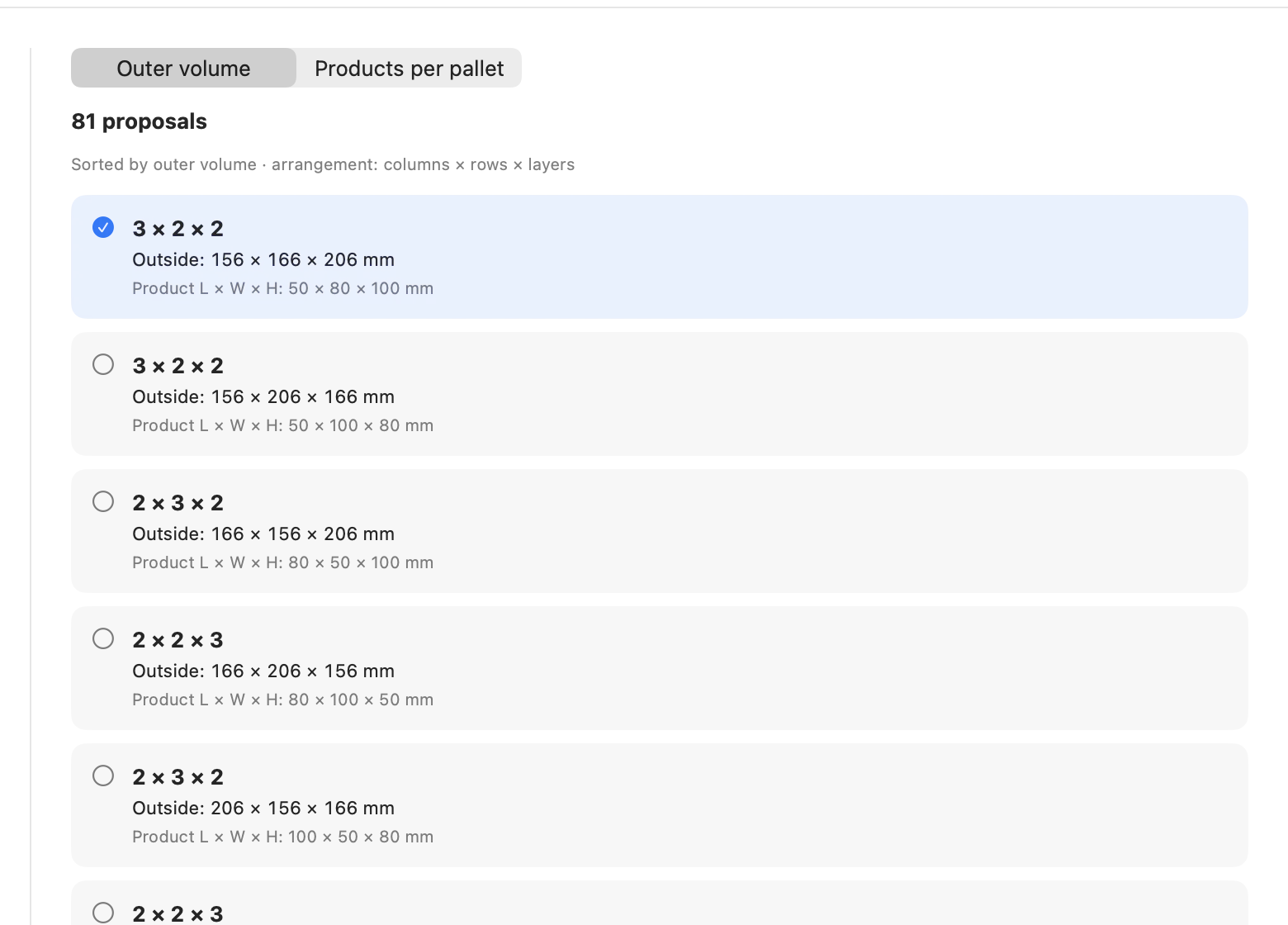
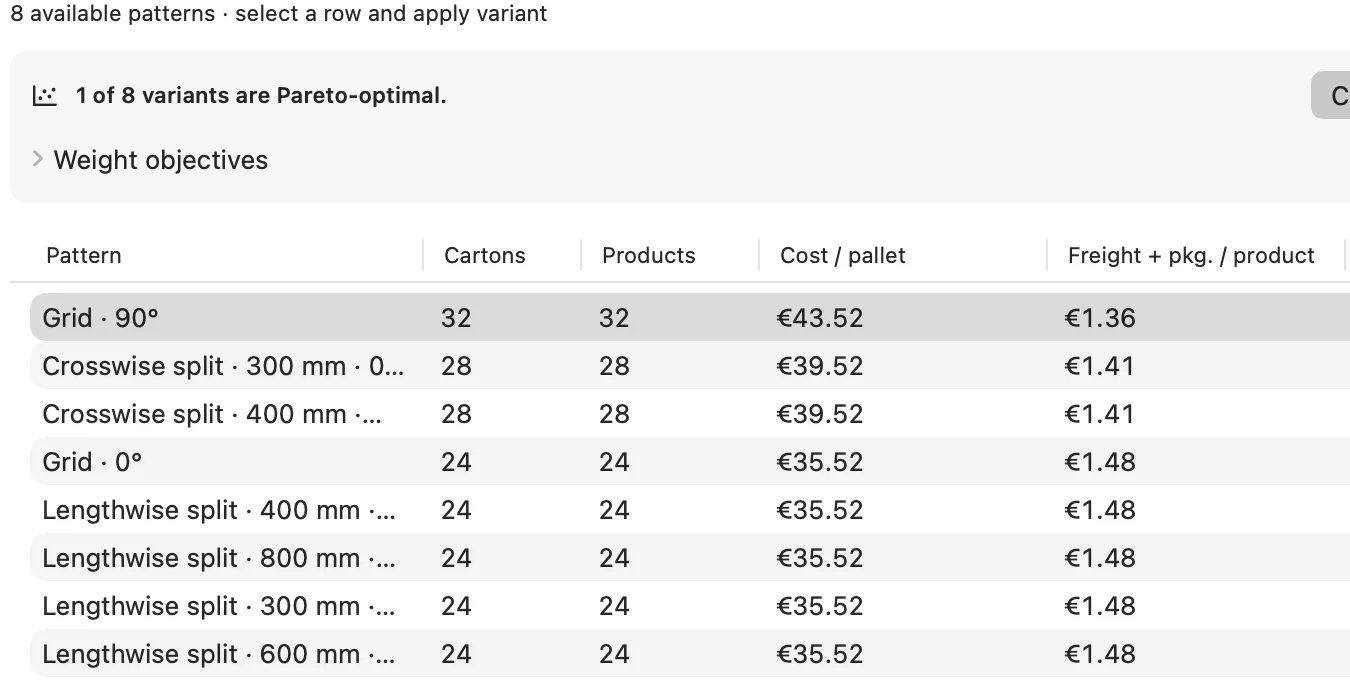
    JetPallet lists possible arrangements with outer dimensions and rates them by products per pallet. With multi-objective scoring you weight several goals against each other and see the Pareto front of sensible trade-offs.

  3. 3

    Check against stock sizes

    Store cartons from your range in the stock carton library, including via CSV or XLSX import. “Check current carton” shows whether a size you already make holds the required quantity – even with empty grid positions.

  4. 4

    Estimate the stacking load

    From edge crush (ECT), board thickness and a safety factor the app estimates BCT and compares it with the load of the full layers above. The result reads permitted, too high or incomplete.

  5. 5

    Document the proposal

    Packing report and comparison PDF with your logo go to the customer; carton designs export as JSON or CSV.

In detail

In detail

01

Master carton calculator with library

The calculator derives possible arrangements and outer dimensions from product size and quantity and shows the pallet pattern for each proposal. The library keeps your standard sizes with name, outer dimensions and weight, so you check new enquiries against what you already have first.
02

Box compression strength after McKee

The estimate uses the simplified McKee formula and an overall safety factor covering storage time, humidity, stacking pattern and overhang. A measured BCT from your lab takes precedence over the formula. If an input is missing, the result is “incomplete”, never “permitted”.

03

Pallet pattern and interlock

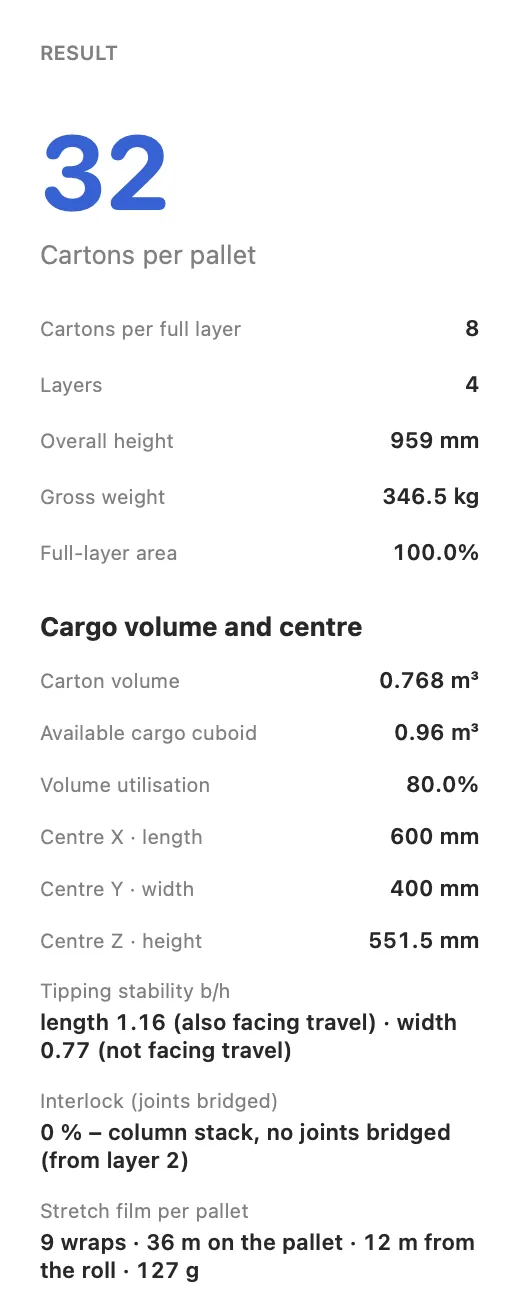
Besides grid and two-block, JetPallet calculates pinwheel, five-block and other patterns. On an industrial pallet of 1,200 × 1,000 mm, a 400 × 300 mm carton gives 9 per layer in a grid and 10 in a two-block pattern. The interlock figure shows how many cartons rest on at least two cartons below – relevant because column stacks and interlocked stacks spread compression load differently.

Pallet pattern and interlock
Actual JetPallet interface.

04

Flat blanks and dividers

For delivering flat blanks, a dedicated tool takes the outline, measured thickness and pieces per bundle and works out bundle dimensions and how they fill the pallet. For inserts, the divider planner calculates outer dimensions, product positions and divider blanks for a single-layer cell grid.

05

A result status, not a claim

Every solution carries a status – geometrically checked, technically plausible or externally verified – and, where known, the gap to the proven optimum. The inspector shows these details right next to the result.

A result status, not a claim
Actual JetPallet interface.

Questions

Frequently asked questions.

Can I use measured BCT values from our lab?

Yes. A measured BCT you enter takes precedence over the McKee estimate. The comparison with the stacking load and the safety factor work the same way.

Does JetPallet create die lines or CAD data for the blank?

No. JetPallet calculates outer dimensions, arrangements and pallet patterns. Its 3D exports show the loaded pallet, not the flat layout of the carton.

How do I work with sizes in inches?

Dimensions can be entered in inches, feet and pounds, fractions included. The display can be metric, dual or imperial.

Back your next carton proposal with numbers

Try JetPallet for 14 days on a real customer enquiry. After that it is USD 99 a year, one version with every feature.

Try it free

Free for 14 days · then USD 99/year

Try it free14 days freeUSD 99/year