JetPallet Try it free

For brands, makers and small manufacturers

Which packaging suits our product – all the way to a loaded truck?

With your own product everything is connected: the retail pack sets the master carton, the carton sets the pallet pattern, the pattern sets the number of pallets and trips. JetPallet calculates that chain in one model. Change one value and pallet, vehicle and cost follow.

What you end up with

  • Packing instruction (PDF) for co-packers and warehouses
  • PDF packing report with logo and order details
  • Scenario and variant comparison as PDF
  • Divider, tray and carton designs as JSON or CSV
  • Reverse plan from product to vehicle as JSON or CSV

Decisions made early that last a long time

In a small company the same person often decides on product design, purchasing and shipping. The questions arrive together:

  • The new jar, tin or box – how many go into a master carton, and is a divider insert or a tray worth it?
  • Your co-packer needs a clear instruction on how to build the pallet.
  • A retailer asks how many units come on a pallet and what it weighs.
  • A few millimetres off the retail pack: does that win an extra layer, or is it effort without effect?

Working each of these out in a separate spreadsheet means starting over with every change.

1200 mm800 mm1028 mmA 600×400×300B 400×200×300C 400×300 × 12D 600×400×140E Ø200×760F 400×200×220
Mixed pallet: cartons, bottles in a tray, sacks and a lying roll. Illustration, calculated with this page’s web calculator.

Workflow

How you work with JetPallet.

  1. 1

    Describe the product

    Enter the size and weight of the finished product – as a box or as an upright cylinder for tins, jars and pails. JetPallet has its own arrangements for round goods: at 100 mm diameter, the mixed arrangement fits 104 instead of 96 per layer on a Euro pallet.

  2. 2

    Choose the secondary pack

    Master carton calculator, divider inserts, tray or shrink pack: each tool works out outer dimensions and shows what they mean for the pallet. You enter the gross weight of the finished unit yourself – the app doesn’t guess material weights.

  3. 3

    Put variants side by side

    The scenario lab stores up to four planning states, for instance a 12-unit carton against a 16-unit one, or three pallet heights. The variant comparison shows patterns, quantities and cost next to each other.

  4. 4

    Follow it through to the vehicle

    Reverse planning chains product, carton, pallet and cargo space and shows, stage by stage, how many units fit and where a limit applies.

  5. 5

    Hand over the instruction

    Packing instruction and packing report go out as PDFs with your logo to co-packer, warehouse or retailer.

In detail

In detail

01

Compare product dimensions

This tool varies the product’s length, width and height within limits you set, without shrinking its volume, and shows how the number of products per pallet changes. Before signing off new packaging you can see whether a change of shape makes any difference in logistics.
02

Patterns beyond the simple grid

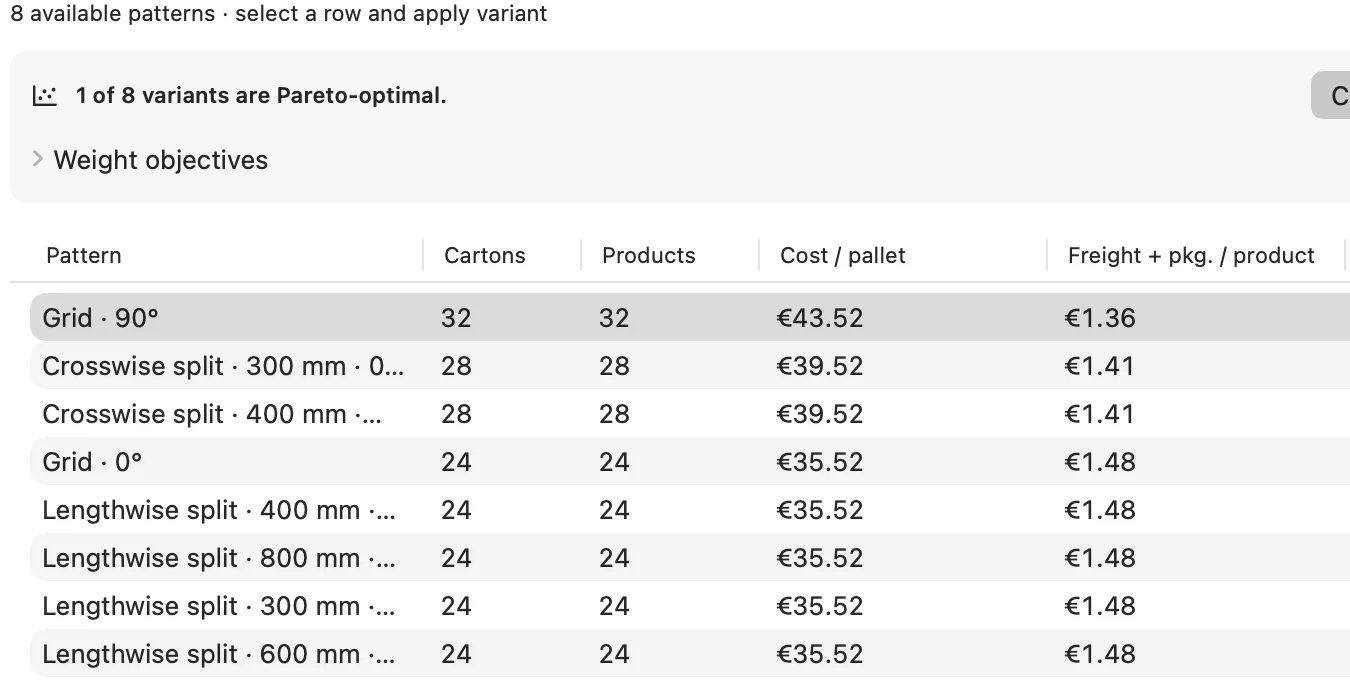
When the carton doesn’t divide the pallet evenly, JetPallet calculates mixed patterns. A 350 × 250 mm carton gives 9 per layer in a grid and 10 in a two-block pattern. Every layer is checked geometrically on its own.

Patterns beyond the simple grid
Actual JetPallet interface.

03

Estimate box compression strength

Whether the bottom carton can carry the load is estimated with the McKee formula from edge crush, board thickness and carton perimeter, using a safety factor you set. If your carton supplier has a measured value, that takes precedence.

04

Cost and CO₂e per unit

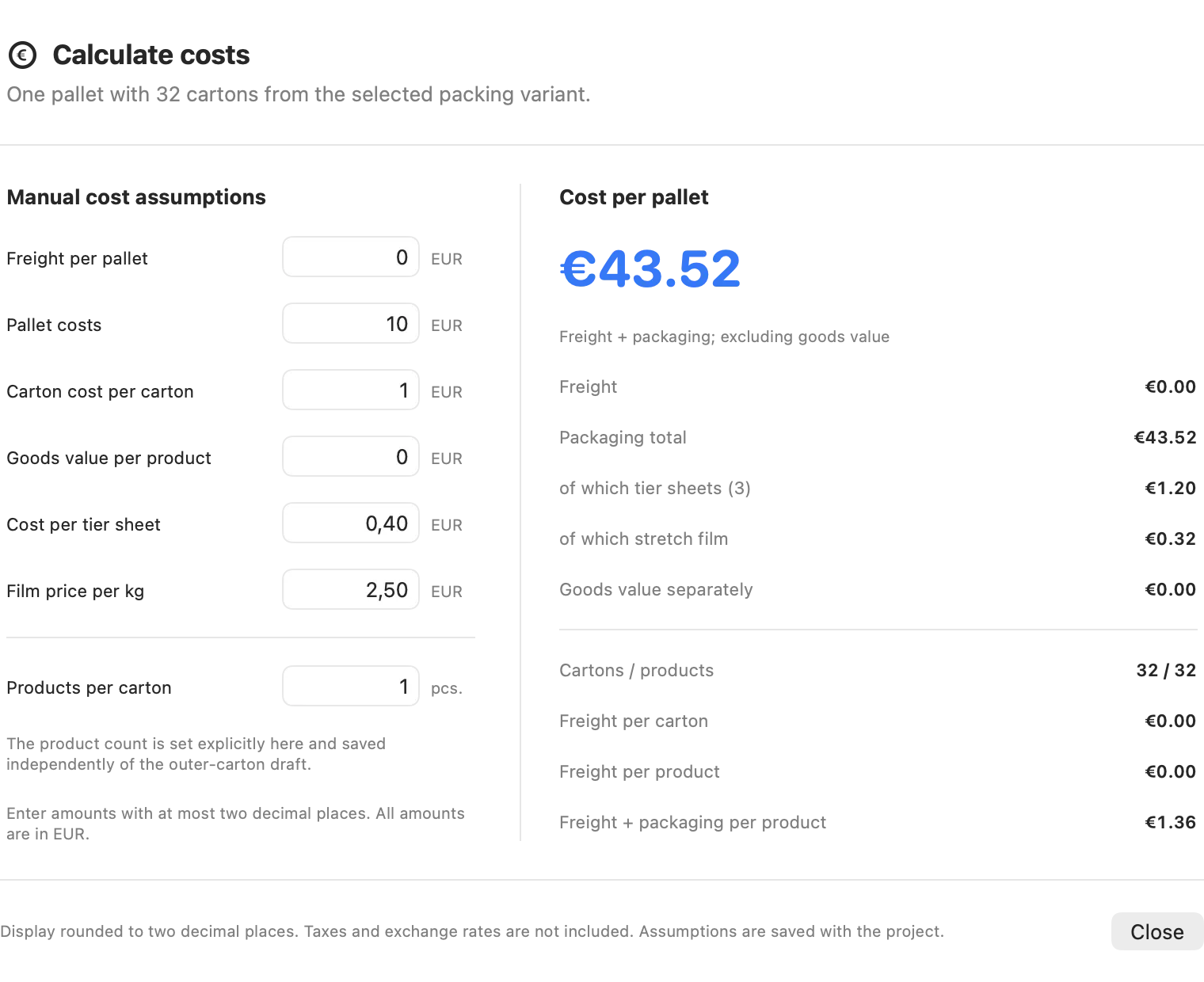
Using your own prices for freight, pallet and carton, JetPallet works out packaging and freight cost per product. CO₂e scenarios show which factors and sources went in. It is not a certified carbon footprint, but a traceable figure for comparing variants.

Cost and CO₂e per unit
Actual JetPallet interface.

05

Reports under your own name

The report template holds company name, address, logo, order number and paper size (A4 or US Letter). Packing report, packing instruction and comparison PDF then share the same header.

Questions

Frequently asked questions.

Can JetPallet handle round products such as tins or pails?

Yes. On the pallet, JetPallet calculates upright cylinders such as tins, pails and drums in grid, honeycomb and mixed arrangements with their own 2D and 3D views. Mixed-load planning adds bottles (with neck size), sacks, rolls lying on their side (as an enclosing box, never load-bearing) and upright trapezoidal prisms. True free-form shapes are not covered.

Does the app work out how heavy my carton will be?

No. You enter the gross weight of the filled carton, tray or bundle. JetPallet doesn’t estimate material weights, so no unsupported figure finds its way into the pallet plan.

How much does JetPallet cost?

There is one version with every feature: free for 14 days, then USD 99 a year as a subscription. If the subscription ends, you can still open and view projects, and your own data such as libraries, cargo-space profiles, articles and CSV templates can still be exported; editing, calculating, exporting, printing and sharing need the subscription. The trial is available once per Apple Account.

Run your product through once

Try JetPallet on macOS 15 or later for 14 days with your own dimensions. For several workstations, get in touch via the contact page.

Try it free

Free for 14 days · then USD 99/year

Try it free14 days freeUSD 99/year